目录
简介
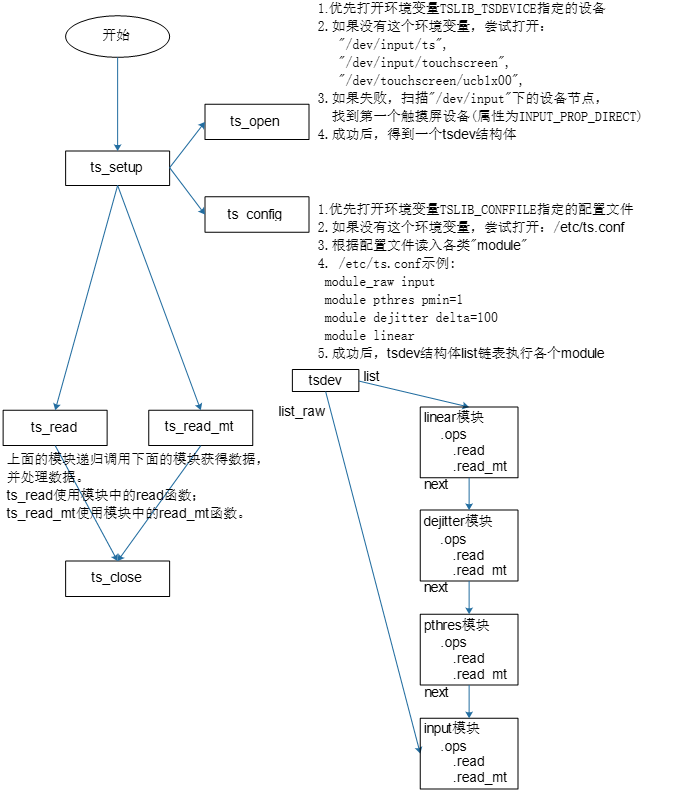
什么是 tslib?
tslib 是一个 C 语言编写的触摸屏事件过滤库,主要功能包括:
- 触摸屏校准:将触摸屏坐标映射到屏幕坐标
- 信号过滤:去除触摸输入中的噪声和抖动
- 多点触摸支持:支持多点触摸事件处理
- 跨平台:支持 Linux、FreeBSD、Android 等操作系统
核心组件
┌─────────────┐
│  应用程序    │  ← 你的程序通过 libts API 读取过滤后的数据
└─────────────┘
      ↑
┌─────────────┐
│   libts     │  ← 核心库,提供 API 和过滤器链管理
└─────────────┘
      ↑
┌─────────────┐
│ 过滤器模块   │  ← median, dejitter, linear 等
└─────────────┘
      ↑
┌─────────────┐
│  raw 模块   │  ← 从设备文件读取原始触摸数据
└─────────────┘
      ↑
┌─────────────┐
│ /dev/input/ │  ← 硬件设备驱动
└─────────────┘
快速开始
1. 安装 tslib
从源码编译
cd tslib-1.21
./configure
make
sudo make install
配置环境变量
export TSLIB_TSDEVICE=/dev/input/event0    # 触摸屏设备
export TSLIB_CALIBFILE=/etc/pointercal      # 校准文件
export TSLIB_CONFFILE=/etc/ts.conf          # 配置文件
export TSLIB_PLUGINDIR=/usr/local/lib/ts    # 插件目录
2. 配置触摸屏
创建配置文件 /etc/ts.conf
# 这是推荐的基础配置
module_raw input              # 从 /dev/input/eventX 读取数据
module median depth=3         # 中值滤波,去除尖峰噪声
module dejitter delta=100     # 去抖动,平滑快速移动
module linear                 # 线性校准,应用校准参数
3. 校准触摸屏
# 运行校准程序
ts_calibrate

# 按照屏幕提示,依次点击出现的十字标记
# 校准数据会保存到 /etc/pointercal
4. 测试触摸屏
# 打印触摸事件
ts_print

# 图形化测试(支持多点触摸)
ts_test_mt
5. 第一个程序
创建 test_touch.c:
#include <stdio.h>
#include <stdlib.h>
#include <tslib.h>

int main(void)
{
    struct tsdev *ts;
    struct ts_sample samp;
    int ret;

    // 1. 打开并初始化触摸屏
    ts = ts_setup(NULL, 0);
    if (!ts) {
        perror("ts_setup");
        return 1;
    }

    printf("触摸屏已就绪,开始监听...\n");
    printf("触摸屏幕任意位置,按 Ctrl+C 退出\n\n");

    // 2. 循环读取触摸事件
    while (1) {
        ret = ts_read(ts, &samp, 1);
        if (ret < 0) {
            perror("ts_read");
            break;
        }

        if (ret != 1)
            continue;

        // 3. 处理触摸数据
        printf("时间: %ld.%06ld  X: %6d  Y: %6d  压力: %6d\n",
               samp.tv.tv_sec,
               samp.tv.tv_usec,
               samp.x,
               samp.y,
               samp.pressure);

        // pressure > 0 表示按下,== 0 表示松开
        if (samp.pressure == 0) {
            printf("  → 触摸松开\n\n");
        }
    }

    // 4. 关闭设备
    ts_close(ts);
    return 0;
}
编译运行:
gcc -o test_touch test_touch.c -lts
./test_touch
配置文件详解
/etc/ts.conf 结构
配置文件定义了数据处理的过滤器链,触摸数据从上到下依次经过每个模块。
基本语法
module_raw <模块名> [参数]     # 第一行必须是 raw 模块
module <过滤器名> [参数]       # 后续是过滤器模块
常用 raw 模块
1. input(推荐,用于 Linux)
module_raw input
# 自动从 /dev/input/event* 查找触摸屏设备

module_raw input grab_events=1
# grab_events=1: 独占设备,防止其他程序干扰
常用过滤器模块
1. median – 中值滤波器
去除触摸信号中的尖峰噪声。
module median depth=3
- depth: 取多少个样本的中值(默认 3)
- 原理:对连续 N 个样本排序,取中间值
- 适用:去除偶然的错误读数
2. dejitter – 去抖动
平滑触摸移动轨迹。
module dejitter delta=100
- delta: 快速移动阈值(默认 100)
- 原理:加权平滑,最新样本权重最大
- 适用:减少手指移动时的抖动
3. linear – 线性校准(必需)
将触摸屏坐标转换为屏幕坐标。
module linear
module linear rot=0           # 不旋转
module linear rot=1           # 顺时针 90°
module linear rot=2           # 180°
module linear rot=3           # 逆时针 90°
- 读取
/etc/pointercal中的校准参数 - 必须运行
ts_calibrate生成校准文件
4. pthres – 压力阈值过滤
过滤压力值太小或太大的触摸。
module pthres pmin=1 pmax=1000
- pmin: 最小压力值(默认 1)
- pmax: 最大压力值(默认 INT_MAX)
5. iir – 无限冲激响应滤波
平滑低频噪声。
module iir N=6 D=10
- N/D: 平滑系数(N=6, D=10 表示 0.6 的平滑度)
- 值越大,响应越慢但越平滑
6. debounce – 防抖动
防止快速连续的误触。
module debounce drop_threshold=40
- drop_threshold: 松开后丢弃事件的时间(毫秒)
7. invert – 坐标反转
反转 X 或 Y 坐标。
module invert x0=1024 y0=768
- x0: X 轴反转中心
- y0: Y 轴反转中心
配置示例
配置 1:基础配置(推荐)
module_raw input
module median depth=3
module dejitter delta=100
module linear
配置 2:高精度触摸屏
module_raw input
module pthres pmin=10          # 忽略轻微触摸
module median depth=5          # 更强的去噪
module iir N=8 D=10            # 平滑处理
module dejitter delta=50       # 更敏感的抖动过滤
module linear
配置 3:多点触摸,低噪声
module_raw input grab_events=1
module median depth=3
module dejitter delta=100
module linear
配置 4:旋转屏幕(顺时针 90°)
module_raw input
module median depth=3
module dejitter delta=100
module linear rot=1
API 使用说明
核心数据结构
单点触摸数据
struct ts_sample {
    int x;                    // X 坐标
    int y;                    // Y 坐标
    unsigned int pressure;    // 压力值(0 = 松开,>0 = 按下)
    struct timeval tv;        // 时间戳
};
多点触摸数据
struct ts_sample_mt {
    int x, y;                 // 坐标
    unsigned int pressure;    // 压力值
    int slot;                 // 触摸点编号(0, 1, 2...)
    int tracking_id;          // 跟踪 ID

    // 以下为扩展字段
    int tool_type;            // 工具类型(手指/笔)
    int tool_x, tool_y;       // 工具坐标
    unsigned int touch_major; // 触摸长轴
    unsigned int width_major; // 宽度长轴
    unsigned int touch_minor; // 触摸短轴
    unsigned int width_minor; // 宽度短轴
    int orientation;          // 方向角度
    int distance;             // 距离
    int blob_id;              // blob ID

    struct timeval tv;        // 时间戳
    short pen_down;           // 按下状态
    short valid;              // 数据有效标志
};
核心 API 函数
1. ts_setup() – 初始化(推荐)
struct tsdev *ts_setup(const char *dev_name, int nonblock);
- 功能:自动查找、打开设备并加载配置
- 参数:
dev_name: 设备路径(NULL = 自动检测)nonblock: 0 = 阻塞模式,1 = 非阻塞模式
- 返回:成功返回 tsdev 指针,失败返回 NULL
示例:
struct tsdev *ts = ts_setup(NULL, 0);  // 自动检测,阻塞模式
if (!ts) {
    perror("ts_setup");
    exit(1);
}
2. ts_open() – 打开设备
struct tsdev *ts_open(const char *dev_name, int nonblock);
- 功能:仅打开设备,不加载配置
- 参数:同 ts_setup()
- 返回:tsdev 指针或 NULL
3. ts_config() – 加载配置
int ts_config(struct tsdev *ts);
- 功能:读取
/etc/ts.conf并加载过滤器链 - 返回:0 = 成功,-1 = 失败
4. ts_read() – 读取单点触摸
int ts_read(struct tsdev *ts, struct ts_sample *samp, int nr);
- 功能:读取经过滤波和校准的触摸数据
- 参数:
ts: 设备句柄samp: 接收数据的数组nr: 期望读取的样本数
- 返回:实际读取的样本数,-1 = 错误
示例:
struct ts_sample samp;
int ret = ts_read(ts, &samp, 1);
if (ret == 1) {
    printf("坐标: (%d, %d) 压力: %d\n",
           samp.x, samp.y, samp.pressure);
}
5. ts_read_mt() – 读取多点触摸
int ts_read_mt(struct tsdev *ts,
               struct ts_sample_mt **samp,
               int max_slots,
               int nr);
- 功能:读取多点触摸数据
- 参数:
samp: 二维数组指针max_slots: 最大触摸点数nr: 期望读取的样本数
- 返回:实际读取的样本数
示例:
#define SLOTS 5
#define SAMPLES 1

struct ts_sample_mt *samp_mt[SAMPLES];
for (int i = 0; i < SAMPLES; i++) {
    samp_mt[i] = calloc(SLOTS, sizeof(struct ts_sample_mt));
}

int ret = ts_read_mt(ts, samp_mt, SLOTS, SAMPLES);
for (int j = 0; j < ret; j++) {
    for (int i = 0; i < SLOTS; i++) {
        if (samp_mt[j][i].valid & TSLIB_MT_VALID) {
            printf("slot %d: (%d, %d) 压力: %d\n",
                   samp_mt[j][i].slot,
                   samp_mt[j][i].x,
                   samp_mt[j][i].y,
                   samp_mt[j][i].pressure);
        }
    }
}
6. ts_read_raw() – 读取原始数据
int ts_read_raw(struct tsdev *ts, struct ts_sample *samp, int nr);
- 功能:读取未经过滤的原始数据
- 用途:调试、查看过滤前的数据
7. ts_close() – 关闭设备
void ts_close(struct tsdev *ts);
8. ts_fd() – 获取文件描述符
int ts_fd(struct tsdev *ts);
- 用途:用于 select/poll/epoll 等多路复用
完整示例程序
示例 1:单点触摸监听
#include <stdio.h>
#include <stdlib.h>
#include <tslib.h>
#include <signal.h>

static struct tsdev *ts = NULL;

void cleanup(int sig) {
    if (ts)
        ts_close(ts);
    printf("\n程序退出\n");
    exit(0);
}

int main(void)
{
    struct ts_sample samp;
    int ret;

    signal(SIGINT, cleanup);

    ts = ts_setup(NULL, 0);
    if (!ts) {
        perror("ts_setup");
        return 1;
    }

    printf("单点触摸监听程序\n");
    printf("触摸屏幕查看坐标,按 Ctrl+C 退出\n\n");

    while (1) {
        ret = ts_read(ts, &samp, 1);
        if (ret < 0) {
            perror("ts_read");
            break;
        }

        if (ret != 1)
            continue;

        if (samp.pressure > 0) {
            printf("按下: X=%d, Y=%d, 压力=%d\n",
                   samp.x, samp.y, samp.pressure);
        } else {
            printf("松开\n");
        }
    }

    ts_close(ts);
    return 0;
}
示例 2:多点触摸监听
#include <stdio.h>
#include <stdlib.h>
#include <tslib.h>
#include <signal.h>

#define MAX_SLOTS 10

static struct tsdev *ts = NULL;

void cleanup(int sig) {
    if (ts)
        ts_close(ts);
    exit(0);
}

int main(void)
{
    struct ts_sample_mt *samp_mt[1];
    int ret, i;

    signal(SIGINT, cleanup);

    ts = ts_setup(NULL, 0);
    if (!ts) {
        perror("ts_setup");
        return 1;
    }

    samp_mt[0] = calloc(MAX_SLOTS, sizeof(struct ts_sample_mt));
    if (!samp_mt[0]) {
        ts_close(ts);
        return 1;
    }

    printf("多点触摸监听程序\n");
    printf("支持最多 %d 个触摸点\n\n", MAX_SLOTS);

    while (1) {
        ret = ts_read_mt(ts, samp_mt, MAX_SLOTS, 1);
        if (ret < 0) {
            perror("ts_read_mt");
            break;
        }

        for (i = 0; i < MAX_SLOTS; i++) {
            if (samp_mt[0][i].valid & TSLIB_MT_VALID) {
                printf("触摸点 %d: X=%d, Y=%d, 压力=%d, ID=%d\n",
                       samp_mt[0][i].slot,
                       samp_mt[0][i].x,
                       samp_mt[0][i].y,
                       samp_mt[0][i].pressure,
                       samp_mt[0][i].tracking_id);
            }
        }
        printf("\n");
    }

    free(samp_mt[0]);
    ts_close(ts);
    return 0;
}
示例 3:非阻塞模式 + select
#include <stdio.h>
#include <stdlib.h>
#include <tslib.h>
#include <sys/select.h>
#include <unistd.h>

int main(void)
{
    struct tsdev *ts;
    struct ts_sample samp;
    fd_set rfds;
    int fd, ret;

    // 非阻塞模式打开
    ts = ts_setup(NULL, 1);
    if (!ts) {
        perror("ts_setup");
        return 1;
    }

    fd = ts_fd(ts);
    printf("使用 select 监听触摸事件(非阻塞)\n\n");

    while (1) {
        FD_ZERO(&rfds);
        FD_SET(fd, &rfds);

        // 等待数据可读
        ret = select(fd + 1, &rfds, NULL, NULL, NULL);
        if (ret < 0) {
            perror("select");
            break;
        }

        if (FD_ISSET(fd, &rfds)) {
            ret = ts_read(ts, &samp, 1);
            if (ret == 1) {
                printf("X=%d, Y=%d, 压力=%d\n",
                       samp.x, samp.y, samp.pressure);
            }
        }
    }

    ts_close(ts);
    return 0;
}
工具程序
1. ts_calibrate – 触摸屏校准
ts_calibrate
功能:
- 显示 5 个校准点(四角 + 中心)
- 依次点击十字标记
- 计算校准参数并保存到
/etc/pointercal
使用建议:
- 首次使用触摸屏时必须校准
- 屏幕旋转后需要重新校准
- 触摸不准时重新运行
2. ts_test_mt – 图形化测试
ts_test_mt
功能:
- 显示触摸轨迹
- 支持多点触摸
- 显示触摸点数量和坐标
3. ts_print – 打印触摸事件
ts_print              # 打印过滤后的数据
ts_print --raw        # 打印原始数据
4. ts_finddev – 查找触摸设备
ts_finddev
输出触摸屏设备路径,如 /dev/input/event0
5. ts_uinput – 虚拟输入设备
ts_uinput -d -v
功能:
- 创建虚拟输入设备
/dev/input/ts_uinput - 将 tslib 过滤后的数据转发到虚拟设备
- GUI 程序可以读取虚拟设备
常见问题
Q1: ts_setup() 返回 NULL
可能原因:
- 触摸设备不存在或权限不足
- 配置文件
/etc/ts.conf找不到 - 环境变量设置错误
解决方法:
# 检查设备是否存在
ls -l /dev/input/event*

# 添加读写权限
sudo chmod 666 /dev/input/event0

# 设置环境变量
export TSLIB_TSDEVICE=/dev/input/event0
export TSLIB_CONFFILE=/etc/ts.conf

# 检查配置文件
cat /etc/ts.conf
Q2: 触摸坐标不准确
解决方法:
# 重新校准
ts_calibrate
Q3: 触摸无响应
检查步骤:
查看原始数据是否有输出:
ts_print --raw检查
/etc/ts.conf配置确认触摸屏驱动已加载
Q4: 多点触摸只能识别一个点
可能原因:
- 配置文件中使用了
variance模块(不支持多点)
解决方法:
- 移除
variance模块 - 使用
median代替
Q5: 编译时找不到 tslib.h
解决方法:
# 指定头文件路径
gcc -I/usr/local/include test.c -L/usr/local/lib -lts

# 或添加到环境变量
export C_INCLUDE_PATH=/usr/local/include
export LIBRARY_PATH=/usr/local/lib
export LD_LIBRARY_PATH=/usr/local/lib
Q6: 运行时找不到 libts.so
# 添加库路径
export LD_LIBRARY_PATH=/usr/local/lib

# 或者更新系统库缓存
sudo ldconfig
进阶话题
1. 交叉编译
# 为 ARM 平台编译
./configure --host=arm-linux-gnueabihf \
            --prefix=/opt/tslib
make
make install
2. 自定义过滤器
参考 plugins/median.c 实现自己的过滤器模块。
3. 与 Qt 集成
# Qt5 使用 tslib
export QT_QPA_GENERIC_PLUGINS=tslib
export QT_QPA_TSLIB_DEVICE=/dev/input/event0
4. 与 X11 集成
使用 xf86-input-tslib 驱动。
总结
核心概念
- tslib 是触摸屏的中间层,位于驱动和应用之间
- 通过过滤器链处理触摸数据
- 支持单点和多点触摸
使用流程
- 配置
/etc/ts.conf - 运行
ts_calibrate校准 - 使用
ts_setup()+ts_read()读取数据
关键文件
/etc/ts.conf– 配置文件/etc/pointercal– 校准数据/dev/input/eventX– 设备文件
文档版本:v1.0
适用 tslib 版本:1.21
最后更新:2026-07-06